Connect product analytics and debugging with a shared context contract
A checkout conversion chart drops after a release. The error feed lights up. Which failure should you fix first, and how do you know it belongs to the journey that stopped converting?
Start with a join you can actually verify: one application, one environment, one attempt, one request. If the only common field between your analytics and errors is a timestamp, you will spend the investigation guessing.
Below is a walkthrough using the SaaS Pro Max public demo, followed by a context contract you can adapt to your own application. The screenshots are real captures of the public demo. Northwind Labs, its customers, payments and incidents are fictional demonstration data, not customer results. The proposed event schema is independent design guidance, not a claim about SaaS Pro Max's SDK payload.
Disclosure: I built SaaS Pro Max.
1. Read the number before diagnosing the bug
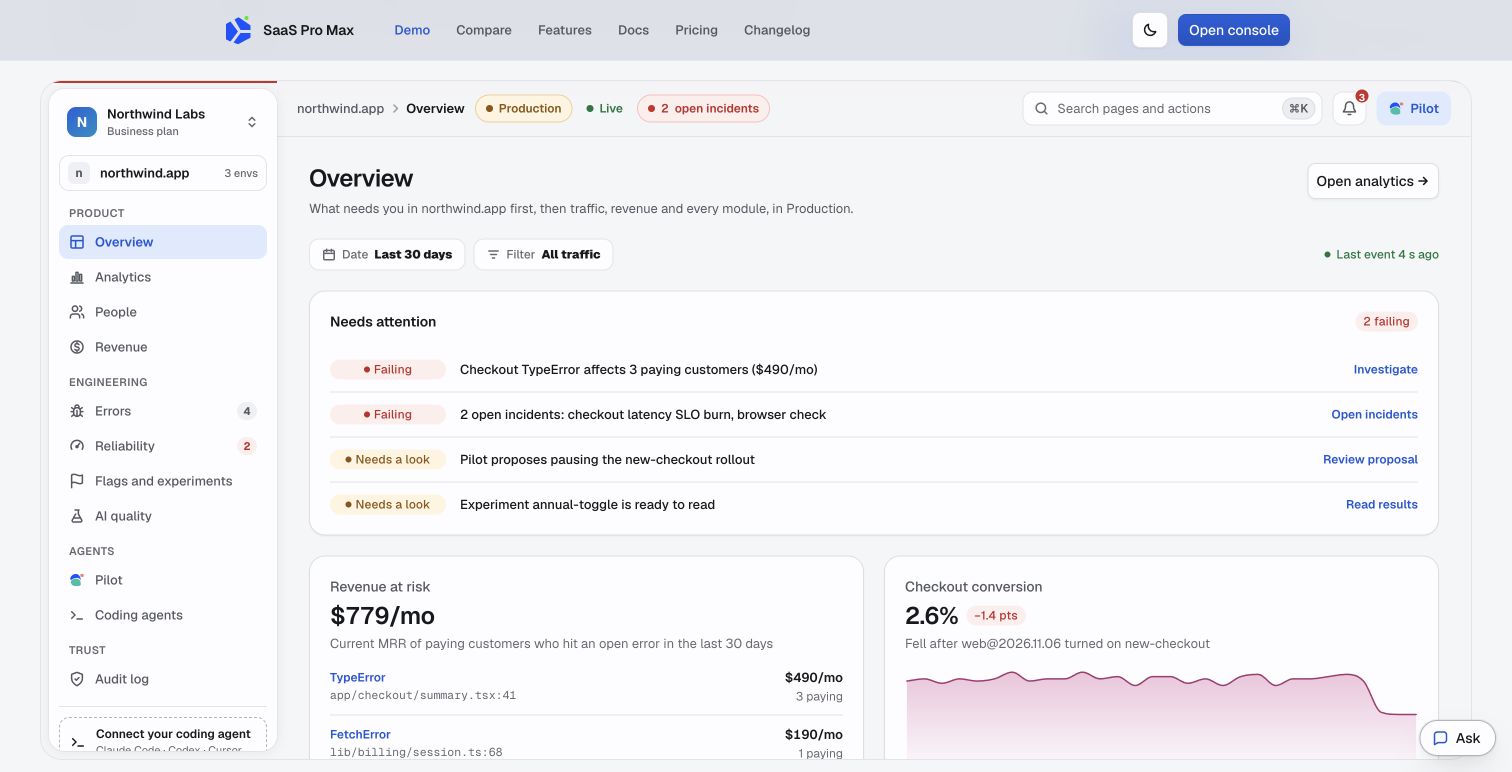
Actual public demo screenshot, captured November 9, 2026. All business figures shown are demonstration data.
The overview gives you two different leads:
- Checkout conversion is shown at 2.6%, down 1.4 percentage points, alongside a release and the
new-checkoutflag. - A checkout TypeError affects three paying customers with $490/month in current subscription MRR.
That second number is useful for prioritization. It is not $490 of proven lost sales or predicted churn. The wider $779/month figure aggregates affected subscription MRR across open errors.
Before opening a stack trace, write down the conversion denominator. A drop from 400 completions out of 1,000 entrants to 240 out of 600 leaves conversion unchanged at 40%. The same 240 completions out of 1,000 entrants means conversion fell to 24%. These are hypothetical arithmetic examples, and they demand different investigations.
Also record the funnel's event order, conversion window, timezone, filters and entry period. Recent entrants may still be eligible to convert. SaaS Pro Max's worked signup investigation guide and funnel matching rules explain those distinctions. A comparison with different window settings can manufacture a regression.
2. Follow the error to a falsifiable hypothesis
In the demo, click Investigate beside the checkout TypeError.
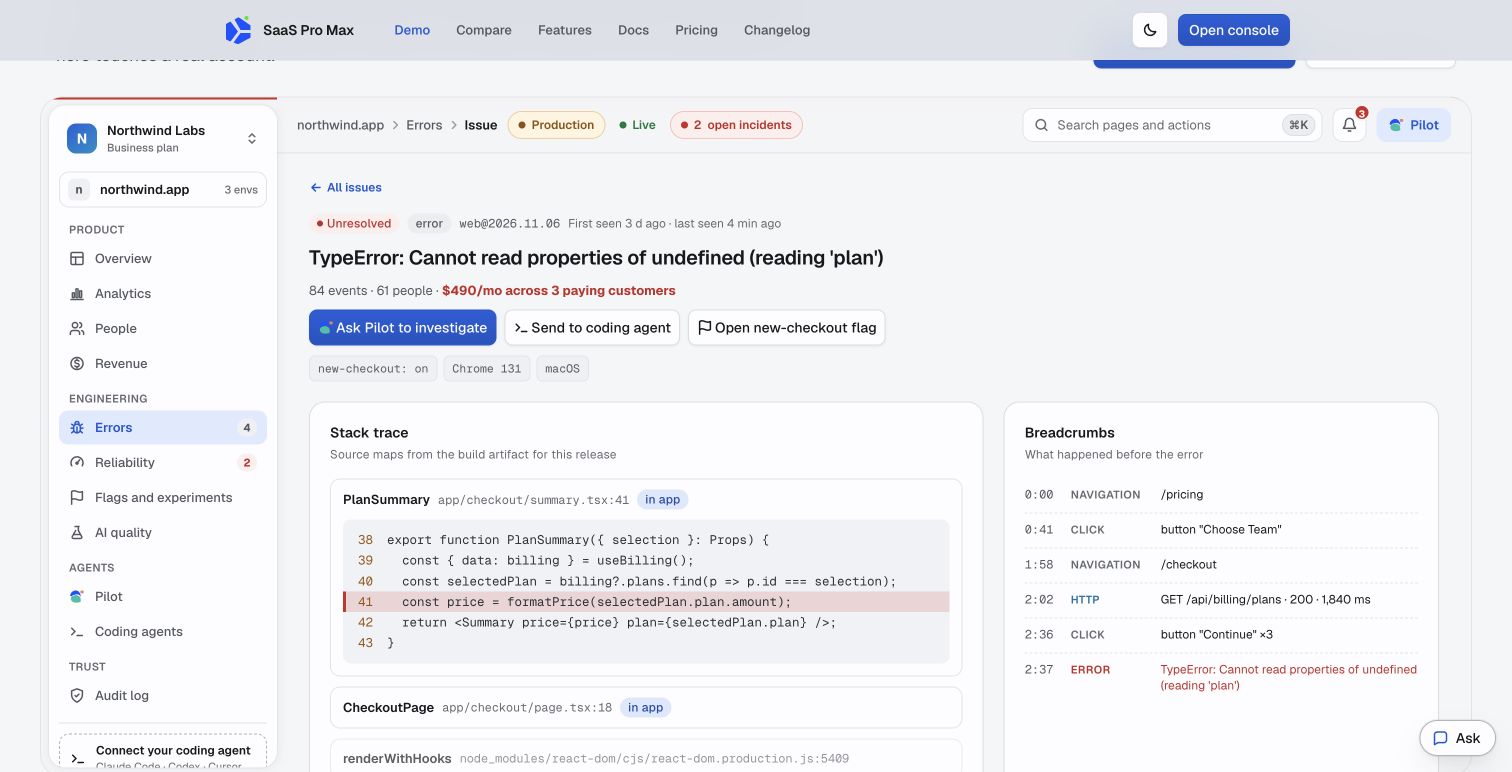
Actual demo issue screen. The release, stack, people counts and amounts are fictional.
The useful details are specific:
- The issue is associated with
web@2026.11.06andnew-checkout: on. - The stack points to
PlanSummary, where code readsselectedPlan.plan.amount. - The breadcrumbs include a billing-plans request and repeated clicks on Continue.
- Below the stack, the demo links a replay and a request trace. The trace illustrates a 1,840 ms billing request, including a 1,610 ms database span.
This gives us a testable hypothesis: the UI can dereference a missing selected plan. Slow loading could expose that path, but a response that lacks the selected plan could do it too. A successful HTTP status does not guarantee a usable object.
Do not infer the precise race from those timestamps alone. Reproduce both conditions in a test environment:
- Delay the billing response and render checkout before it arrives.
- Return a successful response that does not contain the selected plan.
A robust fix needs distinct loading, failed-request and missing-plan states. Merely adding optional chaining can replace a crash with a blank price and leave checkout broken. Assert that Continue stays disabled until a valid selection exists, that the user receives an actionable error if it never becomes valid, and that a successful purchase still completes.
For your own deployment, the error module reference and release-health documentation are the relevant setup checks. A release label is only helpful when the error and deployed artifact agree.
3. Give every attempt a context contract
Person identity is too broad to identify a checkout failure: one person can use two tabs, retry three times and switch accounts. Session identity helps, but an explicit attempt ID makes the unit of investigation clearer.
Here is an illustrative application-owned envelope, with invented values:
{
  "event_id": "evt_demo_83",
  "event_name": "checkout_failed",
  "event_version": 1,
  "occurred_at": "2026-11-09T10:02:37.000Z",
  "app_id": "example-web",
  "environment": "staging",
  "frontend_release": "web-test-42",
  "anonymous_id": "anon_demo_7",
  "session_id": "session_demo_12",
  "attempt_id": "checkout_demo_3",
  "request_id": "request_demo_19",
  "properties": {
    "failure_code": "selected_plan_missing",
    "checkout_variant": "new",
    "plan_code": "team"
  }
}
The contract needs rules, not just field names:
- Event ID: keep it unchanged when retrying delivery of the same event. Generate a new ID for a genuinely new occurrence. Deduplication must be implemented and verified in the receiving system.
- Attempt ID: create it when a checkout attempt begins. Retain it across retries within that attempt; rotate it when the user intentionally starts another.
- Request ID: identify the actual request, not the whole browser session. Propagate or return it using your application's supported mechanism. A request retry can have a new request ID while retaining the attempt ID.
- Release: distinguish frontend and backend releases. They can deploy independently. Do not overwrite both with a single ambiguous version.
- Event time: preserve when the event happened; store receipt time separately so delayed delivery does not rewrite the sequence.
- Variant: record the experience actually used for this attempt. Reading the current flag value days later cannot tell you what the visitor saw.
If distributed tracing is installed, attach the trace and span identifiers supplied by that instrumentation where applicable. A home-grown request ID is not automatically a distributed trace. Leave unavailable fields absent rather than inventing trace references.
4. Define success at the operation, not the button
Use an event sequence with explicit semantics:
checkout_started: the application begins a new attempt.checkout_submitted: it sends the purchase request.checkout_failed: the application observes a failure, with a bounded failure code.purchase_completed: the authoritative backend confirms the successful business operation.
A click on Pay is not a purchase. A client timeout is not proof that payment failed. When a server may complete after the client disconnects, reconcile the attempt against the authoritative transaction before counting it as lost. Keep the analytics event ID separate from a payment provider's idempotency key.
For signup, apply the same rule: emit account-created or workspace-created after success, not when the form is submitted. The analytics reference is a useful place to check event definitions and collection diagnostics before blaming the product flow.
5. Test the joins before trusting the dashboard
Run this small acceptance test in staging:
- Complete one attempt. Confirm exactly one business completion after delivery retries are deduplicated.
- Delay the billing request. Confirm the start, submission and failure records share the intended attempt context.
- Retry within that attempt. Confirm a new request can still be traced back to the same attempt.
- Open two tabs. Confirm their requests do not become one accidental timeline.
- Log out, then sign in as another test account. Confirm subsequent events do not inherit the previous person's identity.
- Disable replay collection. Confirm the investigation still works from events and errors, and the UI does not imply a recording exists.
Opaque identifiers still require privacy controls. Avoid tokens, card details, email addresses and raw form contents in diagnostic properties. Use a small allowlist of fields. Check masking on the actual captured output rather than assuming a configuration switch protects every input.
Read replay setup and limits before relying on a recording. Availability depends on collection, consent, sampling, permissions and retention. No recording is a coverage gap, not evidence of a healthy session.
The deliverable is a reproducible investigation
A useful incident note should fit into five lines:
- Observation: the same defined funnel declined for a comparable cohort.
- Scope: application, environment, releases, variant and time window.
- Evidence: one failing attempt with linked events, request and error.
- Reproduction: the exact delayed or missing-data condition that triggers it.
- Verification: the failing test now passes, events still arrive, and comparable conversion windows have had time to close.
That is the reason to share context across analytics and debugging: you can move from a chart to a test that fails for an understood reason, then verify the fix without changing the question halfway through.
You can explore the demo yourself, or use the SDK overview to map this contract to the integration your application actually uses. Start with one journey and prove the joins before instrumenting everything.
Comments
Join the discussionNo comments yet. Be the first to comment.